
Search for answers or browse our knowledge base.
Connect 2.0 – Preferences
This article will go over the available options within the Preferences section.
To access Preferences, click on Preferences at the bottom of the right menu. The Preferences menu will expand open displaying the setting options. 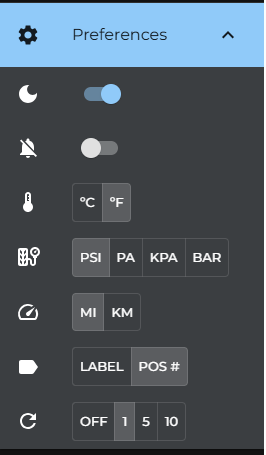
Light or Dark Mode – Allow you to change to light or dark modes.
Admin Email Alerts – Enables/Disables admin email alerts
Temperature Unit of Measurement – Allows you to change the unit of measurement for temperature to Celius or Fahrenheit.
Pressure Unit of Measurement – Allows you to change the unit of measurement for pressure to PSI, PA, kPa, or BAR.
Distance Unit of Measurement – Allows you to change the unit of measurement for distance to Miles or Kilometers.
Tire Naming Mode – Allows you to change the naming convention for tire locations. Can be set to Label (LRO, LRI, RFI, ect.) or by POS# (11, 14, 21, 22, ect.)
Web Refresh Intervals – Allows you to set the refresh duration of the list of Units. The Units page will automatically refresh depending on what’s set.